
TEAM BatteryBar Pro3.1.2 - Get APK
You'll be able to download in few seconds.
Publisher Description
Donation version of the TEAM BatteryBar
Currently 50% Off! 100k Celebration Sale!!!
Please ensure the free version works on your device before donating.
Do you want to ALWAYS have an estimation of how much battery you got left?
Even on fullscreen apps like games or gallery?
And have you by any chance tried MiUI in the past and you miss a certain eye-candy of it?
Yell Welcome to Battery Bar!
You can now easily set a bar with customisable height, location, colors (it can even change according to battery level) and animations.
You won't believe how convenient it is until you try it yourself!
Features include
100% Ad Free (always will be), No fishy Permissions Required!
Charging Animation
-Select Animation type (lots of options with more to come)
Full Screen detection
-Option to hide the bar with the Statusbar
-Compatibility for Older / Custom Phones
Selectable Colours
-Static Color
-Auto-Magicaly Colour any number of combinations and levels
-Charge Colour
-Empty Colour
-Auto Detection of screen Width ( Bar works in Portrait and Landscape Mode on any phone!)
Selectable Height
Selectable Alignment
- Top or Bottom of the screen
- Under Status Bar
- Left, Center or Right Align
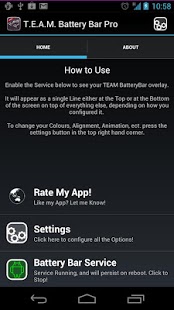
To use Simply start the service,
configure the colors and options to your liking
and Enjoy!
I cant reply to comments on the market please email me for support or ideas :D
About TEAM BatteryBar Pro
The company that develops TEAM BatteryBar Pro is pvyParts. The latest version released by its developer is 3.1.2.
To install TEAM BatteryBar Pro on your Android device, just click the green Continue To App button above to start the installation process. The app is listed on our website since 2013-08-13 and was downloaded 0 times. We have already checked if the download link is safe, however for your own protection we recommend that you scan the downloaded app with your antivirus. Your antivirus may detect the TEAM BatteryBar Pro as malware as malware if the download link to com.pvy.batterybarpro is broken.
How to install TEAM BatteryBar Pro on your Android device:
- Click on the Continue To App button on our website. This will redirect you to Google Play.
- Once the TEAM BatteryBar Pro is shown in the Google Play listing of your Android device, you can start its download and installation. Tap on the Install button located below the search bar and to the right of the app icon.
- A pop-up window with the permissions required by TEAM BatteryBar Pro will be shown. Click on Accept to continue the process.
- TEAM BatteryBar Pro will be downloaded onto your device, displaying a progress. Once the download completes, the installation will start and you'll get a notification after the installation is finished.
Program Details
System requirements
Download information
Pricing
Version History
version 3.1.2
posted on 2013-08-13
*Android 4.3 Fix,*Empty Area Fix,*Fixed Memory Leak in Settings and Color Pages,*Minor Icon Fix,*Added New Colours Tab,*Added Empty Colour,*Added New Multi Level Colours for Automatic Mode,*Added Help Button!,UI Fixes (layout alignments for smaller screens),Animations fixed for a bunch of Phones
version 3.1.1
posted on 2013-01-23
Several fixes and updates
Disclaimer
External Download
We do not host TEAM BatteryBar Pro on our servers. We did not scan it for viruses, adware, spyware or other type of malware. This app is hosted by Galad and passed their terms and conditions to be listed there. We recommend caution when installing it.
The APK Download link for TEAM BatteryBar Pro is provided to you by apps112.com without any warranties, representations or guarantees of any kind, so access it at your own risk.
If you have questions regarding this particular app contact the publisher directly. For questions about the functionalities of apps112.com contact us.
